
Yehuda ai user manual
WELCOME TO YEHUDA
Welcome
Congratulations on purchasing a Yehuda AI Lab-Grown Diamond Detector.
In order to have the best user experience, please carefully read the entire manual and educate yourself on how to properly operate it and get the full benefits from your detector.
Failing to read the full manual may result in costly mistakes.
As we continue to make advancements, this manual in its digital form will be constantly updated. So it is highly recommended to revisit it regularly. For your convenience, you can see when each subject was last updated, so you do not need to go over the entire manual — only the newly updated sections.
Clicking on any of the tabs will take you directly to that section.
As the global leader in lab-grown diamond detection, Yehuda provides the most reliable protection for jewelry professionals worldwide. Our mission is to continue to deliver the latest technological advancements, allowing you to always maximize the benefits of our technology.
Why Do We Keep Releasing New Models?
Because we’re in a race!
Some (though not all) growers are relentlessly focused on one goal: producing a lab-grown diamond that can fool the various detectors on the market and pass as natural.
At Yehuda, we are strategically tied to the market, which allows us to stay ahead of the curve by closely monitoring every new generation of lab-grown diamonds — especially those that are designed specifically to avoid detection. As a result, we’re constantly innovating and releasing new detection technologies to meet the challenge.
Even though our previous models (which were independently verified to detect 100% of lab-grown diamonds available at the time) were highly effective, some of the newest LGDs are too advanced for those systems. That means that Sherlock 1.0, 2.0 and 3.0 have become obsolete, and even the Sherlock 4.0 and Dr. Watson may eventually need to be replaced.
To stay ahead, while using the proven platform that drives our prior generation models as our foundation, we’ve built our latest technology from scratch. It features a powerful internal processor, advanced optics, and proprietary software we innovated that is powered by AI.
- We developed a custom camera (because phone cameras no longer meet the precision requirements our technology demands).
- We made significant advancements while fine-tuning our software.
- We invented a new patented technology to positively identify Cubic Zirconia (CZ).
- We also developed a deep understanding of how to reliably detect Moissanites.
In our testing — which includes hundreads of thousands of stones — the new AI-based system has not failed to detect a single lab-grown diamond.. However, like any advanced system, we do still see a small percentage of false positives (natural diamonds incorrectly flagged as lab-grown). Rest assured that we are actively working to minimize It.
To truly train and perfect this AI model, we plan to test it on over 100,000 stones of from each type in both loose and mounted stones.
Our Commitment
This constant evolution isn’t optional — it’s essential. Yehuda is committed to protecting the jewelry industry, as well as the integrity of natural diamonds, while providing our customers with the most advanced, reliable detection technology available.
We’re not just reacting — we’re leading.
IMPORTANT NOTICE
It is not feasible for us to test every lab-grown diamond in existence. While recognizing this reality, it is theoretically possible that some stones may produce unique or unexpected results.
If you encounter a result that does not align with what you see or expect, please contact us immediately and share the details.
Your feedback is critical — it helps us improve our system and further train our AI models to handle even the rarest cases.
Together, we can continue to strengthen the accuracy and reliability of our technology.
Important Information
- Terms of Use and Privacy Policy are available on our website and within the Yehuda App.
- Yehuda detectors are designed to detect white diamonds in the D–K color range. Diamonds with very low clarity (I2 and below) may sometimes produce unreliable results.
- Do not test fancy-colored diamonds.
- Do not test colored gemstones.
- Works with loose or mounted stones, parcels, and melee (any size).
- Loose diamonds may be tested in thin plastic bags, though this is not recommended.
- Not compatible with thick plastic or glass coverings.
New Features
1. Positive CZ Detection
- Patent-Pending Technology: Induces a distinct pink fluorescence in Cubic Zirconia (CZ) and certain simulants (e.g., synthetic white sapphire).
- High Accuracy: Internal testing demonstrates over 99% accuracy.
- Versatile Use: Works with both loose and mounted stones, down to 0.01 ct.
- Flexible Operation: Visual detection works without AI, with optional AI support.
2. AI-Based Stone Classification (Advisory Only)
- Smart Identification: Assigns a color-coded label to each stone type (Natural Diamond, HPHT, CVD, CZ, Moissanite)
- Application: Works with both loose and mounted stones
- Automatic Detection Size:
- Watson AI: from 0.03 ct
- Sherlock AI: from 0.08 ct
- Manual Marking: Any stone size can be analyzed through manual marking
3. Manual Marking
After the test, any stone not identified by the AI can be manually marked and submitted for analysis by the AI model.
Please watch these training videos:
Included Accessories
Watson AI
- 1 × Loose stone tray (1.5” × 2.5” / 4 × 6.5 cm)
- 1 × Loose stone tray with dividers (1.5” × 2.5” / 4 × 6.5 cm)
- 1 × Slotted ring holder (up to 8 rings)
- 1 × Smartphone
- 1 × Ethernet to USB-C adapter
- 1 × Short USB-C cable
- 1 × Long USB-C cable
Sherlock AI
- 2 × Loose stone trays (1.5” × 2.5” / 4 × 6.5 cm and 4” × 5” / 10 × 13 cm)
- 2 × Loose stone trays with dividers (1.5” × 2.5” / 4 × 6.5 cm and 4” × 5” / 10 × 13 cm)
- 2 × Magnetic finger ring holders
- 1 × Smartphone
- 1 × Slotted ring holder tray (up to 27 rings)
- 1 × Worldwide power supply (110–240V)
- 1 × Ethernet to USB-C adapter
- 1 × Short USB-C cable
- 1 × Long USB-C cable
Power & Charging
Power On/Off
- Press & hold the rear ON/OFF button for 3 seconds.
- Front LED indicates power status.
- Watson AI powers off automatically after 5 minutes of inactivity when not connected to the charger.
- The phone is not charged by the detector— use any USB-C charger to charge it when needed.
- To shut off, press and hold the power button for 3 seconds. The detector will power down gradually.
Charging (Watson AI)
- Charge overnight using any phone charger via the USB port on the back.
- Can be used while charging.
Subscription Fee
A monthly subscription fee of $12.50 is mandatory starting January 1, 2026
($10 per month until that date). The system cannot be used without an active subscription.
What is the subscription used for?
The monthly fee is allocated in three ways:
- Maintaining and continuously updating the app
- Ongoing development of the AI model
- Storage of 1,000 test results in your personal Yehuda cloud space
The fee is per account and covers:
- Up to 10 different detectors, and
- Any number of users under that account
Even if your account uses 10 detectors and 100 different users, the fee remains $12.50 per month.
If you need more storage, you can purchase it directly through the app.
If you prefer to pay quarterly or annually, you can also set this up in the app.
The subscription fee will not increase for at least 3 years.
Warranty
- 1-year warranty under normal use.
- Opening or tampering with the unit voids the warranty.
- Excludes damage from water, impact, misuse, or neglect.
- The smartphone/tablet is not covered.
- Purchasing an extended warranty is available if pursued within 1 month of registration via the Yehuda App.
Setting Up the Yehuda App
After receiving your new detector, follow these steps:
1. Set up your phone and create a Google account.
2. You may use your own account, but we recommend creating a dedicated account for this phone. This account is required to download the App and receive software updates. (No credit card is needed for Google)
3. Open Google Play and search for “Yehuda Detect” or “Sherlock Holmes Detect”.
4. Download and install the Yehuda App.
5. Follow the on-screen instructions to:
- Register your account.
- Add payment information. (Credit Card)
- Add users.
- Turn the detector ON (It takes a few seconds to warm up) and connect your phone using the supplied Ethernet connector and the short or long USB cable.
- Wait for the detector to connect with the phone and press “Continue”.
- You may now begin using your Yehuda detector.
User Types and Permissions
1. Admin
- Creates and manages the account.
- Manages payments and payment information (exclusive to Admins).
- Can invite Admins, Managers, and Users.
- Has full access to all app functions, including cloud settings.
2. Manager
- Can invite Managers or Users.
- Can view business data, but cannot view payment information.
3. User
- Can run tests, view saved tests, and export results.
Note: All user types can perform tests, view saved results, and export data.
Running a Test
⚠️
Important: Always clean loose diamonds and jewelry before testing. Dirt, dust, and fingerprints can alter or obscure the test results.
Steps:
1. Connect the Ethernet adapter to the detector.
2. Connect the USB-C cable between the adapter and your phone.
3. Power on the detector (press and hold the ON/OFF button for 3 seconds).
4. Open the Yehuda App.
5. Wait for the connection message, then close it.
6. Sherlock AI users only → When using the short USB cable, tap the Rotate Screen icon Rotate Screen icon Rotate Screen Royalty-Free Images … at the top of the screen.
7. Tap the Camera icon.
8. Place stones, then aim, zoom, and focus on them.
9. Tap Run Test.
10. To view the AI result, slide the AI Result toggle ON.
- Note: AI can also be enabled later from the Gallery after the test is saved.
IMPORTANT NOTE: The AI is fully cloud-based and cannot work without an internet connection. A stable connection is required to obtain AI results.
Saving a Test
- Tap Continue twice.
- Fill in the desired fields.
- Tap Save.
Starting a New Test
- Tap the Try Again (🔄) icon and confirm, or
- Tap the Trash (🗑️) icon to delete the current test before starting a new one.
Access Saved Tests
- On your phone (Gallery)
- Online at cloud.yehuda.com with your username and password
Yehuda Back Office Instructions – your cloud
The Yehuda Back Office is user-friendly and intuitive.
1. Access the Back Office from your computer or phone:
Go to cloud.yehuda.com.
2. Login:
Enter your username and password to log in.
3.Navigation:
Use the tabs on the left-hand side to access the various features and tools.
4.Gallery Features:
- View all your tests.
- Change test names.
- Filter by date, name, user, or box.
- Sort tests by different criteria.
5.Managing Tests:
- Delete individual tests or multiple tests in bulk.
- Download any number of tests directly to your computer.
6.Viewing AI Probability for Individual Stones:
AI confidence levels for individual stones can only be viewed only here. In the library, after selecting a test, you can enable the AI model. Once enabled, tap on any of the result images to enlarge it. Hover your mouse over any stone to see the AI model’s confidence percentage. A confidence value closer to 1 indicates a higher level of accuracy.
AI Functionality
The AI feature is currently in its early development stage.
In internal testing, it has already demonstrated accuracy above 99%, which is a strong start toward our goal of achieving near-perfect results.
Our experts estimate that after testing approximately 100,000 stones per category, the AI will reach its optimal accuracy level. This process takes time, and we will continue to share updates as development progresses.
👉 For the latest information, please visit often the AI capabilities link:
https://www.yehuda.com/ai-model-current-capabilities
- The AI serves as an advisory tool, not a final authority.
- Ongoing updates will continue to enhance performance.
- Please make sure that no tags or paper are visible, as they may reflect light and cause the AI to give an incorrect result.
Activating the AI Function
After completing or saving a test, toggle the AI button to ON.
You will then be prompted to select whether you are testing loose or mounted stones.
AI Stone Classification Colors
- Color – Classification
- 🔵 Blue Natural Diamond
- 🔴 Red HPHT
- 🟢 Green CVD
- 🌸 Pink CZ (Other Simulants)
- 🟠 Orange Moissanite
- ⚫ Black Refer – AI uncertain (Move the stone and retest. Manual review required)
All result screens will be painted accordingly.
You can tap any screen to enlarge it.
We recommend reviewing the ORIGINAL image with AI markings, but any view can be selected.
If the test is saved, AI results will be stored.
⚠ Important Notes:
- The AI is cloud-based and requires an active internet connection.
- Connection speed affects how long results take to generate.
- You can save a test, enable AI, and continue testing other stones while results process in the background.
- You may also log in anytime at cloud.yehuda.com to review or run AI analysis.
- Once generated, AI results are saved and load instantly upon reopening.
- If you download a test after AI results are ready, an extra image showing AI markings on the original stone will be included.
Factors That May Affect AI Accuracy
Issue
- 1. Unclean stones (loose or mounted)
- 2. Overlapping loose stones
- 3. Rings with side stones
- 4. Strong reflections
- 5. HPHT “flashlight effect”
- 6. Stones in the corner are hard to determine
- 7. Stone is not painted by the AI or painted in black
- 8. Tags or any paper
How to Avoid
- ✅ Always clean all stones thoroughly before testing.
- ✅ Place each stone separately, ensuring none overlap.
- ✅ Retest from multiple angles for full coverage.
- ✅ Slightly reposition the stone and retest.
- ✅ Remove glowing HPHT stones and test nearby stones separately.
- ✅ Reposition stones toward the center of the tray.
- ✅ Reposition the stone and test again. If the same result occurs, use manual decision.
- ✅ Hide tags or any paper.
How to Use AI Results
- 1. Primary Reliance
Always rely on your manual reading first. - 2. AI as a Secondary Check.
Use AI results as supporting information, not as the sole determination. - 3. Handling Discrepancies
- If AI and manual interpretations differ:
- Reposition and retest the stones.
- Report discrepancies to Yehuda Support – these help improve AI accuracy.
- If AI and manual interpretations differ:
Viewing AI Confidence Levels
AI confidence levels are available only through your Back Office at cloud.yehuda.com.
After selecting a test and enabling the AI:
- Tap any result image to enlarge it.
- Hover your mouse over any stone to view its AI confidence percentage.
- A value closer to 100% indicates higher confidence in the classification.
Troubleshooting & Support
For any issues, please visit www.yehuda.com and watch the instructional video that matches your concern.
We have created numerous short tutorials, and you will likely find one that addresses the problem you are experiencing.
Customer Support
📱 In-App Support → Open the app, go to “CONTACT US”, describe the issue, and send it. We will reply by email or phone as soon as possible.
✉️ Email: sh@yehuda.com
🌐 Website: www.yehuda.com
📞 Phone & WhatsApp Support
Region / Service -> Contact Number
🇮🇱 Israel -> +972-3-575-1456
🇺🇸 USA – New York -> +1-212-221-5985
📲 USA – WhatsApp Support -> +1-646-771-4493
🏦 USA – Pawnbrokers (Ido) -> +1-702-523-6982
🇮🇳 India -> +91-98205-11479
🇬🇧 United Kingdom -> +44-7837-450560
🇩🇪 Germany -> +49-176-767-24218
🇮🇹 Italy -> +39-342-855-1746
🇹🇷 Turkey -> +90-532-247-0985
Troubleshooting Guide
First Steps:
If you experience an issue, complete steps 1–5 before moving to advanced troubleshooting.
1. Disconnect all cables. Restart the phone and the detector.
2. Set phone Screen Timeout to 30 minutes
- Go to Settings → Display → Screen timeout and set it to 30 minutes
3. Update your Android phone
- Go to Settings → Software update and install any available updates.
4. Update your detector software (Yehuda App)
- Open the Yehuda App and go to Settings → Check for updates.
5. Watson AI users:
- Shut off Watson AI. Connect to the electricity for 1 hour.
Problem / Error Message -> Solution
⚡ Detector won’t power on -> Check cable → Hold power button 3 sec
🔌 App not connecting -> Restart phone & detector → Check Ethernet & USB
🔍 Images appear blurry -> Tap screen or use focus slider
🎛️ No red markings appear -> Set Red Filter all the way to the left
🛑 “Device cover tray is not closed” – WATSON AI -> Align top cover with base → Press Retry
🛑 “Device cover tray is not closed” – SHERLOCK AI -> Ensure that the drawer is fully shut → Press Retry
📦 “Failed to connect to box” -> Power ON (3 sec) → Wait for green LED → Press Retry, then Close
Yehuda AI Diamond Detector + – FAQ
Q: What does the detector do?
A: It separates natural diamonds from lab-grown (CVD/HPHT) and simulants (CZ, Moissanite).
Q: Which stones can I test?
A: White diamonds (D–K color), CZ, and Moissanites, whether loose or mounted. Not suitable for fancy-color or very low-clarity stones, colored gemstones, or any other gemstones not specifically mentioned here.
Q: How do I know the result?
- Natural Diamond -> Only blue in RESULT. Golden rule: Only blue under LUV (even if RESULT shows more).
- CVD Lab-Grown -> Non-blue fluorescence or glow.
- HPHT Lab-Grown -> Very strong blue-green glow.
- CZ -> Strong pink in Simulants, no glow, no LUV, no non-blue in RESULT.
- Moissanite -> No reaction in RESULT, opaque/black under LUV, no glow in GLOWING.
Q: What if a stone glows?
A: Any glowing stone is lab-grown (never CZ or Moissanite). A natural diamond may glow only if it shows blue under LUV — in that case it is Natural.
Q: How does the Yehuda AI show results?
- Blue = Natural
- Green = CVD
- Red = HPHT
- Pink = CZ
- Yellow = Moissanite
- Black = Refer (needs retest)
Q: How accurate is it?
A: Over 99% in internal testing, and improving with every use.
Q: Can I test stones in jewelry?
A: Yes, rings and jewelry can be tested. Please ensure they are clean.
Q: Can I test parcels or small stones?
A: Yes, the detector works with parcels and melee of any size.
Q: Can I test colored gemstones?
A: No. The detector is not designed to test colored gemstones or fancy-color diamonds.
Q: What is a FALSE POSITIVE result?
A: A False Positive occurs when a natural diamond is mistakenly identified as lab-grown. About 2% of natural diamonds give a false positive result. By comparison, other detectors in the same price range typically have a 5–15% false positive rate.
Q: Can I test lower-color diamonds?
A: Yes, but they will produce a higher rate of false positives. However, if the result indicates Natural Diamond, you can trust it.
Q: Do I need to clean stones first?
A: Yes, dirt or oil can affect results.
Q: Can I test stones inside plastic bags?
A: Thin bags may work, but direct testing is best.
Q: How long does a test take?
A: About 15 seconds.
Q: What if the Yehuda AI shows “Refer”?
A: Retest the stone separately to confirm.
Q: Do I need calibration?
A: No, the detector is self-calibrating.
Q: How do I keep it working properly?
A: Keep the device clean, avoid thick coverings, and update the Yehuda App regularly.
Q: What if I have a technical issue?
A: Use In-App Support: open the app → “Contact Us” → describe the issue and send. We will respond by email or phone as soon as possible.
Training Videos
- Video 1 – Learn how to set up your new Sherlock AI and Watson AI detectors.
- Videos 2–12 – These videos are based on a previous model. They do not demonstrate CZ Detection or AI Classification, but they will help you understand how to operate the detector and interpret the results. The detection rules are the same for both the previous and current models.
- Videos 13–21 – Learn how to identify CZ (Cubic Zirconia) and how to see the AI results.
READING THE RESULT – Basic Guidelines
Test result Images
When testing is complete, six images will be displayed:
1. RESULT – Default test image.
2. LUV – Long-wave UV fluorescence.
3. COLORED – Fluorescence when illuminated by our proprietary lamp.
4. GLOWING – Phosphorescence (glow after the light is shut off).
5. ORIGINAL – Picture of the stones under white light.
6. SIMULANTS – Special pink fluorescence of CZ or other simulants.
IMPORTANT
You should not determine results from the RESULT picture alone.
You must also check the LUV, GLOWING, and SIMULANTS pictures.
Failure to check all will lead to an incorrect identification.
Basic Rules
These are the basic rules to give you a general understanding. You MUST review all detailed rules before making a final determination.
1. Natural Diamond
- If the stone shows blue and only blue in the RESULT picture, it is considered a Natural Diamond.
2. Lab-Grown Diamond
- If the stone glows in the GLOWING picture, it is a Lab-Grown Diamond.
- This glow (phosphorescence) will appear as red markings in the RESULT picture.
Summary:
- If the stone shows any non-blue colors or any red markings in the RESULT image, it is considered Lab-Grown.
GOLDEN RULE
If a stone has blue fluorescence under the LONG UV picture → it is a Natural Diamond.
✅ You do not need to check any other screens.
Now let’s go over all the pictures in details.
Result Picture
- Displays Combined Results: Shows both colored and glowing outcomes.
Interpretation
- 100% Pure Blue Fluorescence (any shade of blue): Natural Diamond
- Any Non-Blue Fluorescence or Red Marking: Lab-Grown Diamond
- Red Marking even over Blue Fluorescence: Lab-Grown Diamond
Additional Notes
- Phosphorescent Stones: Marked in bright red. (Stones that exhibit glowing are lab-grown diamonds.)
- The red overlay intensity may vary; always confirm in the GLOWING picture.
- Filter Adjustment: Use the red filter sensitivity buttons to adjust overlay visibility.
- Best Practice: Always review results across all sensitivity levels, starting from the lowest number (most sensitive), to avoid missing faint phosphorescence.
LUV (Long UV) Picture
- Most Reliable Test Result
Interpretation
- Only Blue Fluorescence: 100% Natural Diamond → (all other test results can be ignored)
- No Reaction or Any Other Color Fluorescence: Disregard the LUV result in the final judgment
Glowing Picture
- Displays phosphorescence after the light source is shut off.
Interpretation
- HPHT Lab-Grown Diamonds: Very strong glow.
- CVD Lab-Grown Diamonds: Some glow or no glow.
- Any Glow (without blue Long UV): Lab-Grown Diamond.
- Simulants: Typically show no glow at all.
COLORED PICTURE
- Displays fluorescence under Yehuda’s proprietary illumination.
- Different stones fluoresce in different colors.
ORIGINAL PICTURE
- Unaltered image under white light.
SIMULANTS PICTURE
- Highlights pink fluorescence suggesting CZ and some other simulants.
- CZ Detection Criteria (All Must Apply):
- Strong pink fluorescence in the SIMULANTS image.
- No fluorescence in LONG UV.
- No phosphorescence in GLOWING.
- No fluorescence or only light-to-medium blue hue in COLORED/RESULT.
- Exclusion Criteria:
EVEN IF A STONE SHOWS PINK FLUORESCENCE IN THE “SIMULANT” PICTURE – IT IS NOT A SIMULANT IF:- Any fluorescence is present in LONG UV.
- Any glow is present in GLOWING.
- Non-blue fluorescence appears in COLORED.
- Performance: >99% detection accuracy (internal validation).
Moissanite Detection
- No fluorescence under COLORED light.
- No glow in GLOWING.
- Under LONG UV: Appears black/opaque.
- AI detects >99% of loose Moissanites accurately. (Internal validation).
Here is a table that summarizes all of the options.
| Stone Type | Identification Rules |
|---|---|
| Natural Diamond |
|
| HPHT Lab-Grown Diamond |
|
| CVD Lab-Grown Diamond |
|
| Cubic Zirconia (CZ) |
|
| Moissanite |
|
| General rules |
|
Golden rule: Never rely on RESULT alone—always check LUV, GLOWING, and SIMULANTS before deciding.
EXAPMPLES
FLASHLIGHT EFFECT
Natural diamonds, CZ, and Moissanites do not exhibit phosphorescence, except in rare cases.
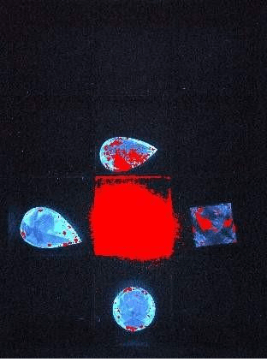
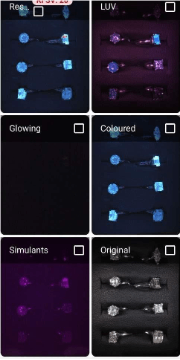
However, sometimes a stone that does not have phosphorescence may still show a red overlay in the RESULT picture because a nearby strongly phosphorescent stone is illuminating it.
Example:
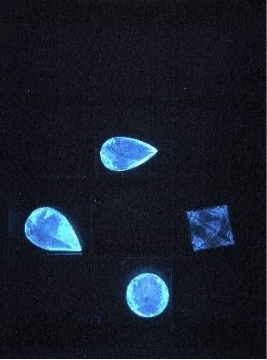
The Center stone is an HPHT lab grown diamond that has very strong GLOWING. It is so strong that it behaves like a flashlight making surrounding stones appear as if they are glowing.
RESULT
GLOWING
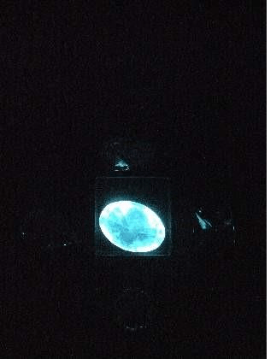
After removing the HPHT stone- the diamonds do not show any GLOWING or red marking any more.

Natural diamonds result screens:
ALL DIAMONDS ARE NATURAL!
- COLORED Picture: Natural diamonds will always appear blue.
- RESULT Picture: Natural diamonds will always appear blue. Some stones may also show red markings due to glowing in the GLOWING picture. However, in the LONG UV (LUV) Picture All 3 loose stone and the EC ring show blue fluorescence, confirming they are 100% natural.
- SIMULANT Picture: Natural diamonds may sometimes show slight pink. They may show stronger pink but these stones will still exhibit blue fluorescence under LUV, which confirms their natural origin. Usually, any pink is just a reflection.
✅ Key Rule: Blue fluorescence in the LUV test always indicates a 100% natural diamond, regardless of other observations.
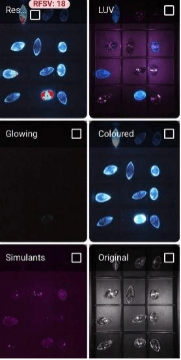
HPHT lab grown diamonds result screens:
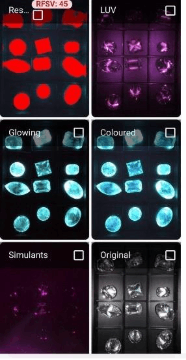
HPHT lab grown diamonds will always shine very strongly in the “COLORED” and the “GLOWING” pictures. They will be painted with full red in the “RESULT” picture.
HPHT will not have a reaction in the LUV picture and diamond may have a minor pink color in the “SIMULANT” picture.
It will usually just be just a reflection.
CVD Lab Grown Diamonds
CVD lab grown diamonds result screens:
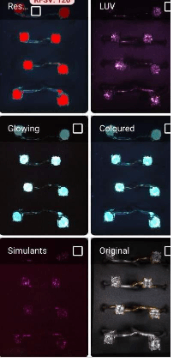
CVD lab grown diamonds will usually shine with NON-BLUE color the “COLORED” and may or may not have glow in the “GLOWING” pictures. They MAY be painted partially or fully in red in the “result” picture.
REMEMBER: if they are any other color than blue- they are CVD.
If they are blue but painted in some red- they are CVD.
Pay attention to the EC in the center bottom raw. It is blue with slight GLOWING thus painted in some red – That is enough to call it a CVD.
CVD are either NON blue or red painted or both.
CVD will usually not have a reaction in the LUV picture. In rare cases it may show a NON blue fluorescent color.
CVD Diamonds: May rarely show pink in SIMULANTS, but once a stone is identified as CVD (non-blue color and/or glowing), the SIMULANT result should be ignored.
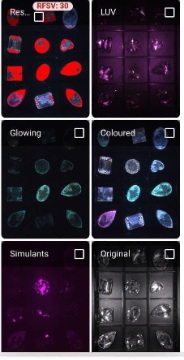
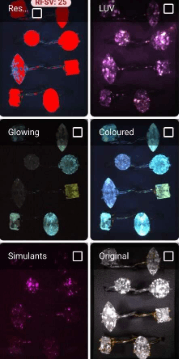
Is it a CVD or an HPHT LAB GROWN DIAMOND?
HPHT Lab Grown Diamonds
- COLORED: strong blue or turquoise.
- GLOWING: Show very strong phosphorescence.
- RESULT: fully painted red.
CVD Lab Grown Diamonds
- COLORED: Usually non-blue colors.
- GLOWING: None to medium phosphorescence.
- RESULT: Mostly non-blue fluorescence and/or some red overlay.
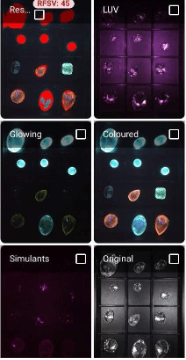
EXAMPLE:
The top 6 diamonds are HPHT Lab Grown Diamonds:
The bottom 6 diamonds are CVD lab Grown Diamonds
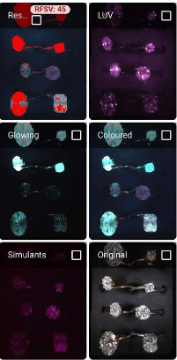
CZ:
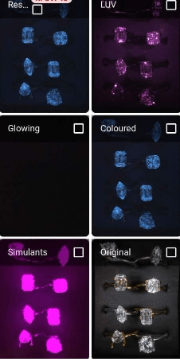
CZ and some other simulants may show some blue around the outline of the stone or as a reflection in the “COLORED” picture, and show very strong pink fluorescence in the “SIMULANT” picture.
REMEMBER: If a stone has a NON-BLUE fluorescence in the COLORED picture, or a glow in “GLOWING” picture or any color in “LONG UV” picture, it cannot be classified as a simulant!
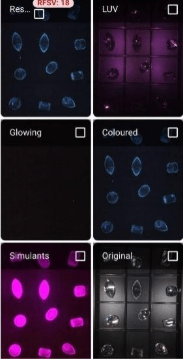
Moissanite:
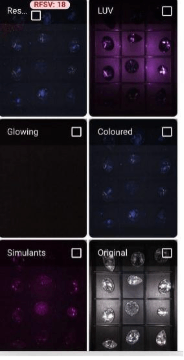
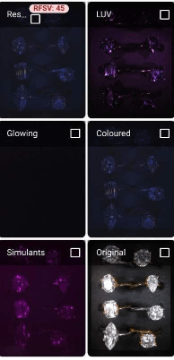
Moissanite will have no reaction in ALL screens.
It may show some reflections, but it will not exhibit fluorescence or phosphorescence,
It does have a unique opaque reaction in the “LONG UV” picture.
Glossary
AI (Artificial Intelligence)
Software built into the Yehuda Detector that analyzes test images and provides advisory color-coded classifications of stones.
COLORED Picture
Test image showing stone fluorescence under Yehuda’s proprietary illumination. Used to detect color responses (blue for natural, other colors for lab-grown).
CVD (Chemical Vapor Deposition)
A type of lab-grown diamond produced by depositing carbon atoms in a vacuum chamber. Typically shows non-blue fluorescence.
Fluorescence
Visible light emitted by some stones when exposed to UV illumination.
- Blue fluorescence → Natural diamond.
- Non-blue fluorescence → Usually lab-grown (CVD or HPHT).
Flashlight Effect
When a strongly glowing stone (usually HPHT) casts a red overlay onto nearby stones in the RESULT image, making them appear as if they are glowing.
GLOWING Picture
Displays phosphorescence after the light is shut off. Used to identify lab-grown stones (HPHT → strong glow, CVD → weak/none).
HPHT (High Pressure High Temperature)
A type of lab-grown diamond created by simulating natural formation conditions (extreme heat and pressure). Typically shows strong glowing and turquoise fluorescence.
LUV (Long-Wave UV)
Test image showing fluorescence under long-wave ultraviolet light. Considered the “King Test”:
- Only blue fluorescence → 100% Natural diamond.
- Any non-blue or no fluorescence → Result must be confirmed with other tests.
Moissanite
A diamond simulant with very high brilliance. Does not fluoresce or glow, but appears black/opaque in the LUV image.
Natural Diamond
A diamond formed naturally in the Earth. Detection rule: blue-only fluorescence under LUV = Natural, regardless of other images.
ORIGINAL Picture
A reference image of the stones in normal white light, without filters.
Phosphorescence
Light that continues to glow after the UV light is turned off. Strong in HPHT stones, sometimes present in CVD.
RESULT Picture
The default test image that combines colored and glowing effects. Shows red markings where lab-grown phosphorescence is detected.
Red Filter
Adjustable sensitivity filter used in RESULT images to highlight red markings from phosphorescence. Must be set to the lowest number for correct results.
SIMULANTS Picture
Special filter image that highlights strong pink fluorescence in CZ and other simulants.
Simulants
Stones that look like diamonds but are not real diamonds (e.g., CZ, Moissanite, synthetic white sapphire).
USB-C Cable & Ethernet Adapter
Supplied accessories used to connect the detector to the smartphone for power and data transfer.
Disclaimer
The results provided by Sherlock AI and Watson AI are made available “as is”, without any guarantees or warranties regarding their completeness, accuracy, or reliability.
These systems are provided without warranty of any kind, either express or implied, including but not limited to the implied warranties of merchantability, fitness for a particular purpose, and performance.
In no event shall the Company, its affiliates, stockholders, officers, directors, agents, or employees be liable to you or any third party for any decision made or action taken based on the information provided by Sherlock AI or Watson AI. This includes, but is not limited to, any consequential, special, or incidental damages, even if the Company has been advised of the possibility of such damages.